
The marketing and sales teams spend over 550 hours a year looking for bad data, disconnected numbers, bounced emails, and outdated job titles that kill pipeline velocity. A trustworthy, verified B2B database removes this friction by making sure every contact record is current, accurate, and ready for outreach, helping you convert 27–35% more leads without raising ad spend or headcount.
Why B2B Teams Struggle with Data Quality
The majority of B2B databases experience a 30% annual decline due to employee turnover, company name changes, disconnected phone numbers, and inactive email addresses. Nevertheless, 78% of sales teams admit that nobody has the time to manually remove duplicate, outdated, or incomplete records from their CRM.
Common problems with unverified b2b data lists:
- Collapse of email deliverability: Spam filters are triggered by bounce rates greater than 5%, which damages the sender’s reputation for all subsequent campaigns.
- Cycles of lost sales: Due to the unreliability of CRM data, representatives manually research prospects for four to six hours every week.
- Budget leakage: 30–40% of your advertising expenditures are directed towards individuals who departed the company months ago, due to paid advertising to bad contact lists.
- Compliance infractions: GDPR fines and CAN-SPAM penalties are triggered by outdated consent records or invalid email addresses.
- Pipeline forecasting errors: When 25% of “opportunities” are built on bad contacts, revenue projections become meaningless
The price isn’t just waste; it’s lost confidence. When sales teams stop trusting CRM data, they revert to manual prospecting, spreadsheets, and personal notes, completely ignoring the systems you’ve invested in.
What Is a Clean & Verified B2B Database?
A fresh B2B database is a data archive where data are continually verified toward real-world resources, duplicates are merged, outdated information is flagged, and verification methods guarantee 95%+ accuracy across important areas such as email deliverability, phone connectivity, and job title currency. Clean lists prioritize quality over quantity, emphasizing contacts you are able to reach rather than large list sizes.
Key characteristics of verified b2b contact lists:
- Email verification: Every address is tested for deliverability using SMTP checks, spam trap detection, and bounce prediction (not just format validation)
- Phone number validation: Direct dial numbers are confirmed as active, and mobile numbers are flagged separately from office lines
- Job change monitoring: Automated alerts when contacts switch companies or roles, triggering record updates within 30 days
- Duplicate detection: In order to combine redundant records, fuzzy matching algorithms identify variations in name spelling, email domains, and business names.
- Management of consent and suppression: Unsubscribe lists, opt-outs, and “do not contact” signals are strictly enforced across all outreach channels
Clean B2B Database vs. Contact List vs. Lead List
| Factor | Clean B2B Database | B2B Contact List | Lead List |
| Purpose | Long-term CRM foundation with verified, maintained records | Static snapshot of contacts for one-time campaigns | Marketing-qualified prospects showing buying intent |
| Data accuracy | 90–95% (continuously verified) | 60–75% (decays after purchase) | 75–85% (recent but not always verified) |
| Update frequency | Real-time or monthly automated checks | One-time delivery, no maintenance | Refreshed per campaign cycle |
| Best for | Sales teams, ABM programs, multi-touch sequences | Event invites, one-off email blasts | Demand gen teams nurturing active prospects |
| Typical source | Owned CRM data + enrichment tools | Purchased b2b data lists from vendors | Inbound forms, content downloads, webinar signups |
The Unspoken Expenses of Unclean B2B Data
Beyond being a straightforward waste of time, unverified b2b contact lists lead to growing problems that harm revenue, credibility, and team morale.
Cost 1: Sales Time Waste (The $23,000 Per Rep Problem)
When 25–40% of CRM records are outdated, sales reps waste 550+ hours annually on:
- Researching correct contact details manually via LinkedIn, company websites, and Google
- Calling disconnected numbers or emailing bounced addresses
- Re-qualifying leads because firmographic data (company size, industry) was wrong from the start
The math: An AE will waste $23,000 in labor per representative if their fully loaded annual cost is $120,000 and they spend 550 hours on incorrect data. For a 10-person sales team, dirty data costs $230,000 annually in unproductive time alone.
Cost 2: Destroyed Email Deliverability (The Invisible Penalty)
Hard bounce rates above 5% signal to inbox providers (Gmail, Outlook, corporate email filters) that you’re sending to low-quality lists. Once your domain reputation drops:
- Future emails land in spam folders even for valid contacts (20–40% inbox placement drop)
- It takes 60–90 days of perfect sending behavior to recover reputation
- You may need to migrate to a new sending domain entirely, losing years of established sender trust
What triggers this: Purchased b2b data lists from shady vendors, failure to verify emails before import, and ignoring bounce reports for 6+ months.
Cost 3: Misdirected ABM and Ad Budgets
When your target account lists contain outdated contacts:
- LinkedIn ads target people who left those companies 8 months ago
- Direct mail goes to old office addresses or the wrong decision-makers
- ABM platforms charge you for “engaged” accounts, where 40% of contacts are invalid
Real example: A SaaS company spent $50,000 on ABM advertising targeting 200 enterprise user accounts, only to find 35% of their list of contacts were wrong (people had changed jobs). $17,500 was spent on advertisements that did not reach the target demographic.
How to Build and Maintain a Clean B2B Database
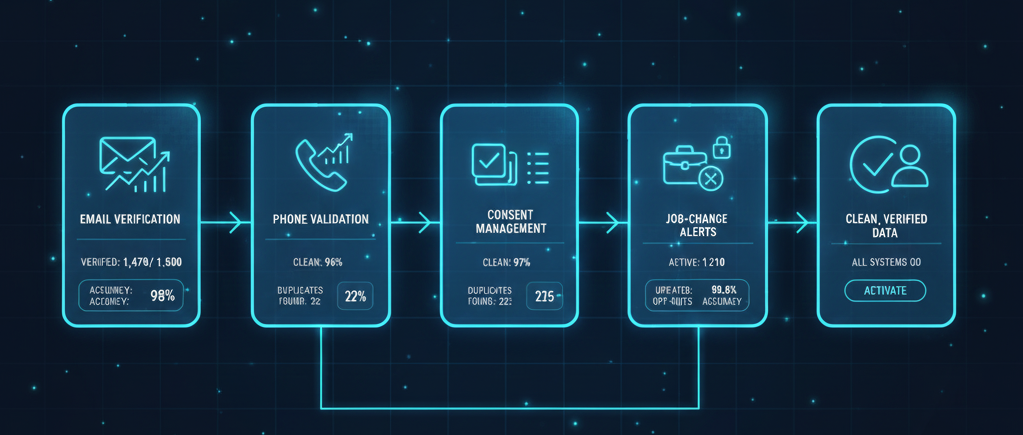
Database cleaning is a continuous process that calls for automated workflows, frequent audits, and team accountability..
Step 1: Examine the Quality of Your Current Data
From your CRM, export a statistically significant sample of 1,000–2,000 records, then manually confirm:
- Email deliverability (check validity using a verification tool)
- Phone number accuracy (call 50 random numbers to test connectivity)
- Job title currency (LinkedIn-check 100 contacts to see if they still hold the same role)
- Duplicate rate (search for common names and domains to find duplicates)
Key metrics to calculate:
- Bounce rate (target: under 3%)
- Duplicate percentage (target: under 5%)
- Incorrect records missing important information (target: under 10%)
- Records have not been revised in more than 12 months (flag for verification)
Step 2: Put Real-Time Email Verification into Practice
Include email verification at the moment of capture:
- In order to prevent inaccurate emails from entering your CRM, add a verification API to online forms.
- Use tools like Clearout, ZeroBounce, or NeverBounce to confirm deliverability in real time.
- Establish a monthly batch confirmation for the current records, giving high-value sections priority.
Best practices:
- Check emails 72 hours after they are collected (before they expire).
- Flag “risky” email addresses (role-based messages like info@, catch-all domains) for review by hand
- Suppress known complainants and spam traps naturally
Step 3: Add Verified Sources to Missing Data
To close gaps in your business-to-business contact lists, use data enrichment platforms:
- Add any missing phone numbers, job titles, and business information from sources such as Apollo, Cognism, or ZoomInfo.
- Set confidence thresholds (only accept data with 90%+ accuracy ratings)
- Prioritize enrichment for active opportunities and high-intent accounts (don’t waste budget enriching cold leads)
Key considerations:
- Enrichment is not verification; always verify email deliverability separately
- Budget for re-enrichment quarterly to catch job changes and phone updates
- Track enrichment accuracy by provider to identify which sources perform best
Step 4: Deduplicate Ruthlessly
Run deduplication quarterly using fuzzy matching algorithms:
- Merge records with matching emails, even if names or companies differ slightly
- Consolidate variations in company names (e.g., “IBM” vs. “International Business Machines”)
- Keep the most recently updated record when merging duplicates
Common deduplication rules:
- Email match = automatic merge
- Same first name + last name + company domain = likely duplicate (manual review)
- Same phone number across multiple records = merge unless clearly different people
Step 5: Monitor Job Changes and Contact Movement
Set up alerts for when contacts in your database change jobs:
- Use tools like LinkedIn Sales Navigator, Surfe, or data providers with job change tracking
- Automatically flag records when someone leaves their company (many enrichment platforms offer this)
- Update records within 30 days or move them to a “past contacts” segment
Workflow tip: When a key contact leaves, immediately research their replacement and add the new decision-maker to your database, updating the old contact’s status accordingly.
Step 6: Enforce Suppression and Consent Management
Maintain centralized suppression lists that sync across all platforms:
- Unsubscribes from email campaigns
- “Do not call” requests from sales outreach
- Bounced emails (hard bounces should be permanently suppressed)
- Spam complaints and abuse reports
Critical: Your suppression list must be honored across all email, calling, LinkedIn outreach, and any other channels. A single violation can permanently damage a reputation.
Step 7: Schedule Regular Database Hygiene Sprints
Build data maintenance into your quarterly planning:
- Monthly: Verify high-priority account contacts (active deals, target accounts)
- Quarterly: Run full database deduplication and enrichment on top-tier segments
- Annually: Deep-clean entire database, archive inactive records (no engagement in 18+ months)
Who owns this: RevOps or data operations teams should own the process, with sales and marketing accountable for flagging bad data when they encounter it.
Conclusion: Clean Data Isn’t a Luxury-It’s Your Competitive Advantage
Your competitors spend an hour making sales for every hour your sales team spends pursuing disconnected numbers or looking up out-of-date contacts. Today, the most successful businesses in B2B aren’t those with the largest contact lists, but rather those with the cleanest. When your database accuracy hits 95% or more, marketing campaigns yield predictable ROI, pipeline forecasts become trustworthy enough to influence hiring and investment decisions, and sales teams have enough faith in the data to act on it right away. Not only do clean, verified B2B databases reduce waste, but they also produce a compounding effect where each outreach effort reaches the intended recipient, your email reputation remains spotless, and your CRM turns into a reliable resource rather than a source of annoyance.
Talk to a Data Expert Stop wasting time and start converting more leads. Contact us today to discuss your data verification needs and see our solution in action.
FAQ
High-priority segments (active deals, target accounts) should be verified monthly. The broader database requires quarterly deduplication and annual deep-cleaning. At a minimum, verify emails before every major campaign and phone numbers before cold calling sprints.
Under 3% is excellent, 3–5% is acceptable, and above 5% indicates serious data quality issues that will harm deliverability. If your bounce rate exceeds 8%, pause outbound email immediately and run full list verification before resuming.
Vendors may claim their lists are verified, but data decays rapidly after purchase. Even “freshly verified” purchased lists typically have 15–25% invalid contacts within 90 days. Always verify any purchased data yourself before importing it into your CRM.
Email verification costs $0.003–$0.01 per check (volume discounts apply). Phone verification costs 02 to 05 per number. Full enrichment with firmographic and technographic data costs $0.15–$0.50 per record, depending on the level of data details.
Mark them as invalid rather than deleting them immediately. Create a “quarantine” segment for bad data sometimes, contacts return to valid emails after leaving a company, or you discover you had the wrong record entirely. Permanently delete only after 12–18 months of confirmed invalidity.
No. Enrichment adds missing information but doesn’t validate deliverability. A record can be “enriched” with a phone number that’s been disconnected for six months. Always verify deliverability separately, especially for email and phone.